This post is about how I built my personal blog using Next.js.
Github Repo
Why I built a blog
I had wanted to start a blog and write posts for a while.
To get the ball rolling, I started with a Naver Blog. Naver Blog is a great platform, but its style felt more suited to everyday life and travel than to development writing.
Seeing other developers use platforms like Tistory, Velog, or Medium—or build their own personal blogs—made me think, "I'd like to run a blog like that someday."
I had two options: use an existing blog platform or build my own. Since I was going to do it anyway, I wanted to learn something in the process, so I decided to build it myself.
Why Next.js
There are many ways to build a blog yourself, but I was deciding between Next.js and Gatsby.
The only frontend stack I had hands-on experience with was React, so I wanted something React-based or close to it, which is why these two ended up as my candidates.
I also had a few requirements for the blog:
- Serverless
- SEO-friendly
- Markdown support
- Learning by building the blog myself
Items 1–3 are well supported by both Next.js and Gatsby.
Both handle SSR and SSG well, which is good for SEO. The serverless requirement is covered by writing posts in markdown and deploying via GitHub Pages.
That leaves "Learning by building the blog myself".
At my previous company I had only done CSR development, so I hadn't used Next.js yet. While preparing to change jobs earlier this year, I noticed that most frontend job postings listed Next.js in their stack.
Since I hadn't used Next.js before, and I figured this blog could later serve as part of my portfolio, I chose Next.js.
Pages Router vs App Router
Right as I was getting ready to start with Next.js, Next.js 13 went stable and I found myself at another crossroads.
The reason was the difference between the existing Pages Router and Next.js 13's new App Router.
Pages Router
The routing system Next.js supported before version 13 (still supported after 13). It uses files like _app.tsx, _document.tsx, and [page].tsx inside src/pages to define routes.
App Router
The new routing system introduced in Next.js 13. You create a folder per page inside src/app and use files like layout.tsx and page.tsx to define routes.
Honestly, I didn't agonize over this much. Here's why:
First, I hadn't really used either Pages or App Router, so switching to App Router wasn't a big hurdle.
Second, since App Router was now stable, it had become the officially recommended approach for Next.js, so using it felt like the right call.
Third, I figured there weren't many articles about App Router development yet, so writing about my experience here might bring a few more readers to my blog.
There are quite a few high-quality articles about it now.
For the reasons above, I built the blog using the App Router.
Stack
Next.js 13 TypeScript Yarn Tailwind CSS github-markdown-css mdx bright gray-matter Github-Pages Github Actions
Directory structure
In src
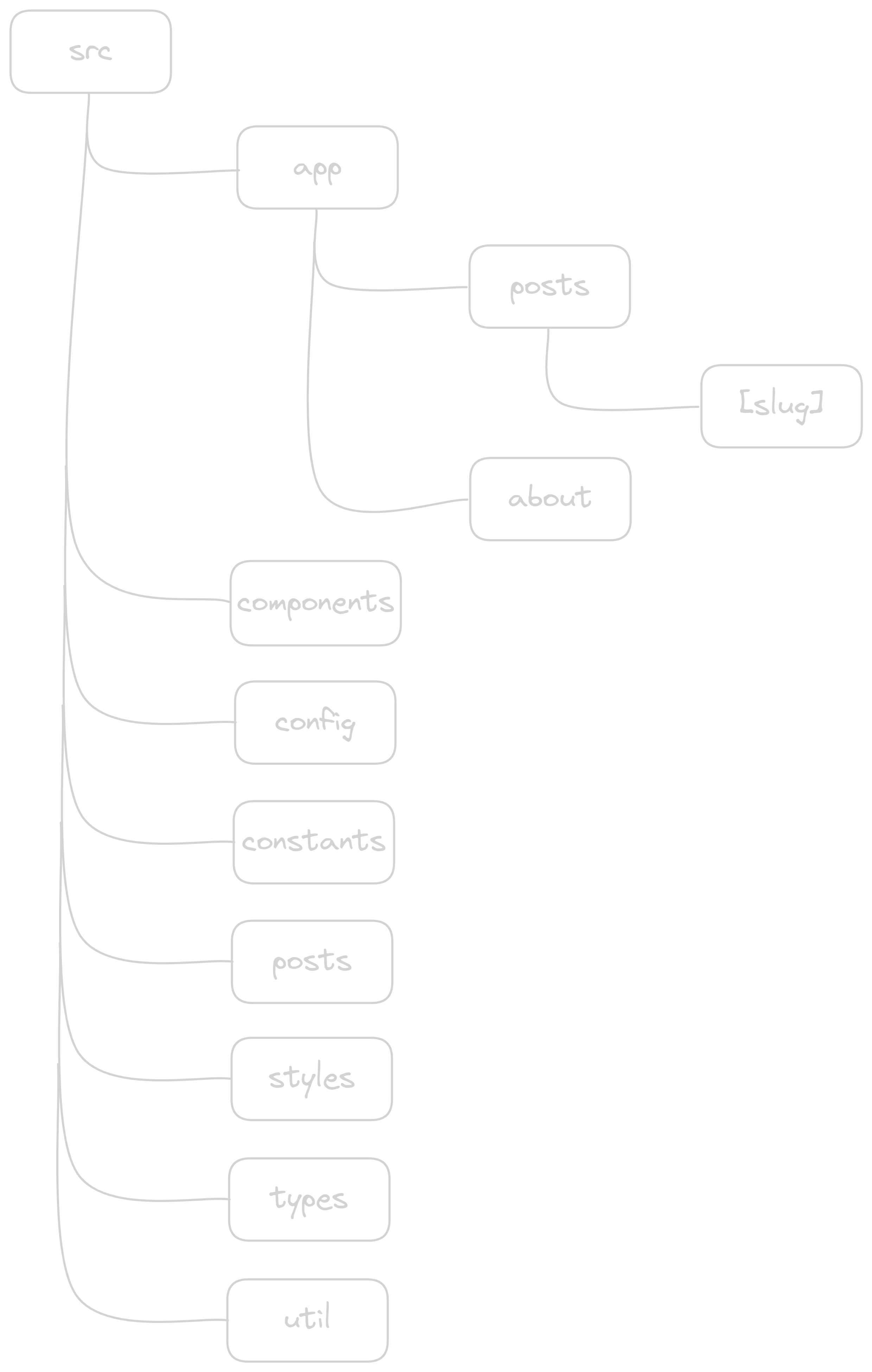
App Router
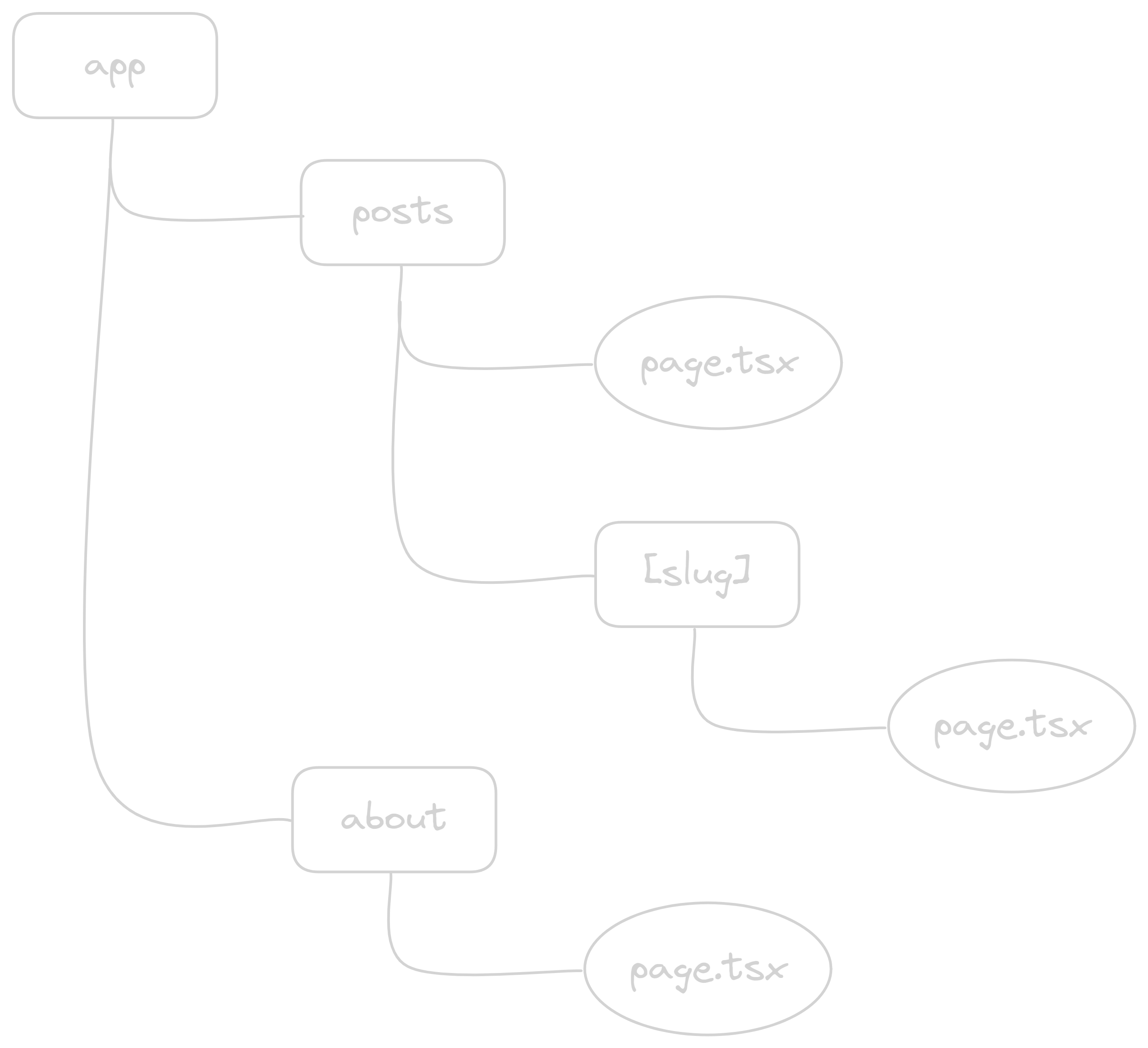
As of writing (2023.12.21), the directory structure looks like this; it may change later as I add features.
(Sidebar navigation is planned)
Development process
1. App Router and layout
With App Router, you define layouts with layout.tsx and pages with page.tsx.
The code below is layout.tsx, the file that defines a layout shared across every page.
- app/layout.tsx
// src/app/layout.tsx
import type { ReactNode } from 'react';
import type { Metadata } from 'next';

import { defaultMetadata } from '@/config/site';

import Header from '@/components/header';
import Footer from '@/components/footer';

import '@/styles/globals.css';
import 'pretendard/dist/web/static/pretendard.css';

export const metadata: Metadata = defaultMetadata;

export default function RootLayout({ children }: { children: ReactNode }) {
  return (
    <html lang="ko">
      <body className="dark:bg-dark-bg">
        <Header />
        {children}
        <Footer />
      </body>
    </html>
  );
}
In layout.tsx, I set up Header and Footer, and render each page from page.tsx as children.
Metadata is the API for defining metadata on each page.
It's needed for SEO, so define the metadata that makes sense for each page.
2. Loading posts
I wrote each post as an mdx file.
To load the mdx files, I wrote getPosts and getPost helpers.
- util/getPost.ts
// src/util/getPost.ts
import { cache } from 'react';
import fs from 'fs/promises';
import matter from 'gray-matter';
import path from 'path';
import type { FrontMatter } from '@/types/posts';

export const getPosts = cache(async () => {
  const posts = await fs.readdir('./src/posts/');

  return Promise.all(
    posts
      .filter((file) => path.extname(file) === '.mdx')
      .map(async (file) => {
        const filePath = `./src/posts/${file}`;
        const postContent = await fs.readFile(filePath, 'utf8');
        const { data, content } = matter(postContent);

        return { ...data, body: content } as FrontMatter & { body: string };
      }),
  ).then((posts) => posts.sort((a, b) => (new Date(a.date) > new Date(b.date) ? -1 : 1)));
});

export async function getPost(slug: string) {
  const posts = await getPosts();
  return posts.find((post) => post?.slug === slug);
}

export default getPosts;
getPosts reads files from the src/posts folder where the mdx files live.
getPosts is wrapped with React's cache helper. cache is designed for Server Components and memoizes the result of the wrapped function.
gray-matter is used to parse the front-matter of each mdx file into a regular object.
---
title: 'Building a Blog with Next.js 13 App Router'
description: 'My story of building a personal blog with the Next.js 13 App Router'
date: '2023.12.21'
tags: ['Front-End', 'TypeScript', 'React', 'Next.js']
slug: 'nextjs-blog'
---
Example of front-matter. It sits at the top of an mdx file.
I use the parsed front-matter to render the title, description, date, tags, and so on for the post list.
I also call sort to order posts by most recent date first.
Below that, getPost calls getPosts to fetch the list of posts, then finds and returns the one matching a given slug.
3. The posts and about pages
The blog is structured into /post and /about pages.
3-1. /post page
The /post page is the blog's main page and shows the list of posts.
It reads each mdx file in src/posts and renders them as a list.
Clicking a post item navigates to that post using the post's slug.
- posts/pages.tsx
// src/app/posts/page.tsx
import Link from 'next/link';

import Container from '@/components/container';
import Tag from '@/components/tag';

import getPosts from '@/util/getPost';

export default async function Posts() {
  const posts = await getPosts();

  return (
    <Container>
      <ul>
        {posts.map(({ slug, title, description, date, tags }) => (
          <li key={slug} className="group dark:border-dark-bo flex-col border-b last:border-b-0">
            <Link href={{ pathname: `/posts/${slug}` }} className="block py-4">
              <strong className="mb-2 block text-xl group-hover:underline">{title}</strong>
              <p>{description}</p>
              <span className="text-xs">{date}</span>
              <div className="mt-3">
                {tags.map((tag) => (
                  <Tag key={tag} name={tag} />
                ))}
              </div>
            </Link>
          </li>
        ))}
      </ul>
    </Container>
  );
}
It uses getPosts to load the post list and renders the items from that data.
When you click a post, it navigates to /post/[slug], which is handled via Dynamic Routes in Next.js.
The /post/[slug] page shows an individual post.
It uses getPost with the slug to load that post's data.
If the post data isn't found, the page calls Next.js's notFound function to display a 404 page.
- posts/[slug]/pages.tsx
// src/app/posts/[slug]/page.tsx
import { Metadata } from 'next';
import { notFound } from 'next/navigation';
import { MDXRemote } from 'next-mdx-remote/rsc';

import { siteConfig, defaultMetadata } from '@/config/site';

import Container from '@/components/container';
import PostHeader from '@/components/postHeader';
import Title from '@/components/title';

import { getPost, getPosts } from '@/util/getPost';

import { mdxComponents } from '@/app/mdx-components';

import 'github-markdown-css';

export async function generateStaticParams() {
  const posts = await getPosts();

  return posts.map(({ slug }) => ({ slug }));
}

export async function generateMetadata({
  params,
}: {
  params: { slug: string };
}): Promise<Metadata> {
  const post = await getPost(params.slug);

  return {
    ...defaultMetadata,
    title: `${post?.title} - hywlss9`,
    description: post?.description,
    openGraph: {
      ...defaultMetadata.openGraph,
      title: `${post?.title} - hywlss9`,
      description: post?.description,
      url: `${siteConfig.url}/posts/${params.slug}`,
    },
  };
}

function PostBody({ children }: { children: string }) {
  return (
    // @ts-ignore
    <MDXRemote source={children} components={mdxComponents} />
  );
}

export default async function Post({ params }: { params: { [key: string]: string } }) {
  const { slug } = params;

  const post = await getPost(slug);

  if (!post) return notFound();

  return (
    <Container>
      <PostHeader date={post?.date} border={true}>
        <Title>{post?.title}</Title>
      </PostHeader>
      <div className="markdown-body">
        <PostBody>{post?.body}</PostBody>
      </div>
    </Container>
  );
}
generateStaticParams is a Next.js 13 helper for defining a page's paths.
It's used to build SSG static pages at build time.
It must return an array of params objects with string values.
Since I use slug as the param for each post's URL, I extract slug from the post list data and return it.
generateMetadata is a Next.js 13 helper for defining a page's metadata.
It's used to build metadata for dynamic routes at build time.
mdx files don't include styles by themselves, so I used github-markdown-css to apply GitHub's markdown styles.
I used MDXRemote to render the mdx files. It loads and renders mdx content.
Through its components prop, you can define which components are used inside the mdx.
- app/mdx-components.tsx
// src/app/mdx-components.tsx
import Link from 'next/link';
import Image from 'next/image';
import type { ImageProps } from 'next/image';
import type { MDXComponents } from 'mdx/types';
import { Code } from 'bright';

export const mdxComponents: MDXComponents = {
  pre: Code,
  a: ({ children, ...props }) => {
    return (
      <Link
        {...(props as React.RefAttributes<HTMLAnchorElement>)}
        href={props.href || ''}
        target="_blank"
      >
        {children}
      </Link>
    );
  },
  img: ({ ...props }) => {
    return <Image {...(props as ImageProps)} />;
  },
  ul: ({ children }) => {
    return <ul className="list-disc">{children}</ul>;
  },
};
I created mdx-components, a file that overrides the default components used in mdx.
To style code blocks in posts, I made the pre tag render with bright.
Besides
bright,prism-react-rendereris also widely used.
For a tags I use Next.js's Link.
For img tags I use Next.js's Image.
You can override plenty of other tags this way too.
3-2. /about page
The /about page is the introduction page.
I'm fine putting some personal info there myself, but I didn't want it to show up in search results, so I used robots.ts to block search engines from indexing it.
- app/robots.ts
// src/app/robots.ts
import { MetadataRoute } from 'next';

import { siteConfig } from '@/config/site';

export default function robots(): MetadataRoute.Robots {
  return {
    rules: {
      userAgent: '*',
      disallow: '/about',
    },
    sitemap: `${siteConfig.url}/sitemap.xml`,
  };
}- about/pages.tsx
// src/app/about/page.tsx
import type { ReactNode } from 'react';
import type { Metadata } from 'next';
import Link from 'next/link';

import { defaultMetadata, siteConfig } from '@/config/site';

import Container from '@/components/container';

export const metadata: Metadata = {
  ...defaultMetadata,
  title: 'About Park Hyeongjin - hywlss9',
  description: 'About developer Park Hyeongjin.',
  openGraph: {
    ...defaultMetadata.openGraph,
    url: `${siteConfig.url}/about`,
    title: 'About Park Hyeongjin - hywlss9',
    description: 'About developer Park Hyeongjin.',
  },
};

interface AboutListData {
  title: string;
  content: string;
  link?: string;
}

const INFO: AboutListData[] = [
  { title: 'Name', content: 'Park Hyeongjin' },
  // ... additional data
];

const HISTORY: AboutListData[] = [
  { title: 'ARTiPIO', content: '2020.08 ~ ing', link: 'https://artipio.com' },
  // ... additional data
];

const SubTitle = ({ children }: { children: ReactNode }) => (
  <h3 className="py-2 text-xl">{children}</h3>
);

const HarfBasisText = ({ children }: { children: ReactNode }) => (
  <span className="basis-1/2">{children}</span>
);

export default function About() {
  return (
    <Container className="flex-col items-center justify-center">
      <div className="mx-auto max-w-740">
        <SubTitle>Park Hyeongjin's BLOG</SubTitle>
        <div className="mb-2">
          <p>Hello,</p>
          <p>I'm Park Hyeongjin, a frontend developer.</p>
        </div>
        <div>
          <p>
            If you spot an issue with the blog content or a bug, please leave a note at the link
            below. Thanks :)
          </p>
          <Link
            href="https://github.com/hywlss9/hywlss9.github.io/issues"
            target="_blank"
            className="bg-transparent text-[#0969da] no-underline hover:underline"
          >
            Blog Issues
          </Link>
        </div>
        <br />
        <hr className="mt-4mb-2" />
        <SubTitle>Info</SubTitle>
        {INFO.map(({ title, content }, index) => (
          <div key={index} className="flex items-center">
            <HarfBasisText>{title}</HarfBasisText>
            <HarfBasisText>{content}</HarfBasisText>
          </div>
        ))}
        <hr className="mt-4 mb-2" />
        <SubTitle>History</SubTitle>
        <ul>
          {HISTORY.map(({ title, content, link }, index) => {
            return (
              <li key={index} className="flex">
                <HarfBasisText>
                  {link ? (
                    <Link href={link} target="_blank" className="hover:underline">
                      {title}
                    </Link>
                  ) : (
                    title
                  )}
                </HarfBasisText>
                <HarfBasisText>{content}</HarfBasisText>
              </li>
            );
          })}
        </ul>
      </div>
    </Container>
  );
}
There isn't much technically interesting about the about page.
It just keeps data in arrays and maps over them to render a list.
Since the blog doesn't have much in the way of design elements right now, this kind of page was enough.
SEO
For SEO I used sitemap.ts, robots.ts, and metadata.
robots.ts and metadata were covered above, so I'll skip them here.
sitemap.ts
sitemap.ts uses Next.js's sitemap support to generate a sitemap.xml.
- app/sitemap.ts
// src/app/sitemap.ts
import type { MetadataRoute } from 'next';

import { siteConfig } from '@/config/site';

import { getPosts } from '@/util/getPost';

export default async function sitemap(): Promise<MetadataRoute.Sitemap> {
  const posts = await getPosts();
  const postsUrls = posts.map((params) => `${siteConfig.url}/posts/${params.slug}`);

  return [
    {
      url: siteConfig.url,
    },
    {
      url: `${siteConfig.url}/about`,
    },
    {
      url: `${siteConfig.url}/posts`,
    },
    ...postsUrls.map((url) => ({ url })),
  ];
}
getPosts loads the post list, then combines siteConfig.url with each slug to build each post URL.
With this in place, sitemap.xml is generated at build time, so search engines can read it and crawl the site.
Deployment
I deployed the blog with Github Pages and Github Actions.
- .github/workflows/deploy.yml
name: Deploy Next.js site to Pages

on:
  push:
    branches: ['main']
  workflow_dispatch:

# Content omitted

concurrency:
  group: 'pages'
  cancel-in-progress: false

jobs:
  build:
    runs-on: ubuntu-latest
    steps:
      # Content omitted
      - name: Build with Next.js
        run: ${{ steps.detect-package-manager.outputs.runner }} next build
      - name: Static HTML export with Next.js
        run: ${{ steps.detect-package-manager.outputs.runner }} next export
      - name: Upload artifact
        uses: actions/upload-pages-artifact@v2
        with:
          path: ./out

  deploy:
    environment:
      name: github-pages
      url: ${{ steps.deployment.outputs.page_url }}
    runs-on: ubuntu-latest
    needs: build
    steps:
      - name: Deploy to GitHub Pages
        id: deployment
        uses: actions/deploy-pages@v2
For the workflow file I used the one Github Actions already provides for Next.js.
My Git branch strategy is to do all development on a dev branch, open a pull request to main, and merge it.
Sometimes when I'm lazy, I just work directly on main..
When the merge is done, Github Actions runs to build and deploy automatically.
Closing
My first blog isn't 100% complete yet, but it can show an introduction and posts without major issues, so I went ahead and wrote this post.
A lot of developers I know use platforms like Tistory, Velog, or Medium because building one themselves is a hassle. If this post helps even slightly to show that, as a frontend developer, building your own blog with a recent version of Next.js is a good option too, then it has done its job.
I'm still early in my journey as a developer, and this blog and post are far from polished.
I'll keep studying and try to write better posts going forward.
References
Next.js 13
[Translation] Building a Blog with Next.js 13 and React Server Components - surim014
gray-matter - skh417